Google ADK: Building Multi-Agent Systems
Agent Types in ADK
In the Agent Development Kit (ADK), an agent is an independent execution unit designed to act autonomously to achieve specific goals. Google ADK provides different types of agents that can be extended from the base Agent class.
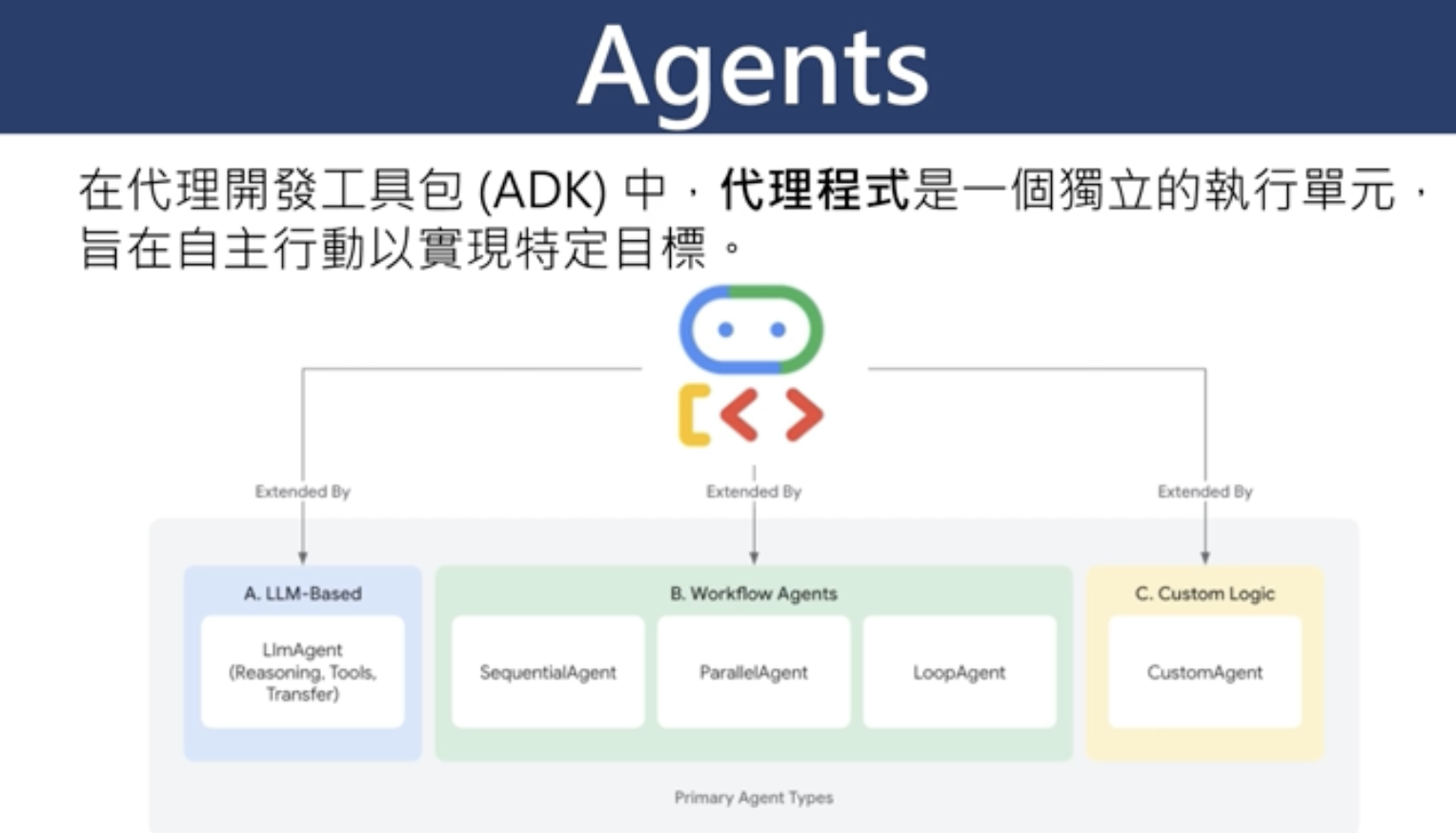
The diagram illustrates the primary agent types in Google ADK:
- A. LLM-Based Agents: LlmAgent for reasoning, tool usage, and transfer capabilities
- B. Workflow Agents: Including SequentialAgent, ParallelAgent, and LoopAgent for structured processes
- C. Custom Logic: CustomAgent for specialized implementations
Official Resources
For comprehensive documentation, tutorials, and API references, visit the official Google Agent Development Kit website:
Google ADK DocumentationOverview
Google has announced a Multi-Agent Interaction Communication Protocol (Agent to Agent, Protocol A to A) that enables agents from different vendors and platforms to communicate and collaborate. Along with this protocol, Google has open-sourced the Agent Developer Kit (ADK) and an agent marketplace.
What is ADK?
ADK is a flexible, modular framework for developing and deploying AI agents. It works with popular LLMs and open-source AI tools, with special integration for Google's ecosystem and Gemini models. It allows developers to easily create simple agents powered by Gemini models and Google AI tools, while providing structure for more complex agent architectures.
Key Features:
Agent Engines
The foundation of all agents in ADK is the Base Agent class, which can be extended in three main ways:
- LLM Agents: Use LLM models as core engines for reasoning, planning, and dynamic tool selection
- Workflow Agents: Use predefined control paths for predictable, structured processes
- Custom Agents: Extend the Base Agent directly for specialized logic and integration
Building Your First Agent
Prerequisites:
- Install Google ADK
- Install LiteLLM
Implementation Steps:
- Create a project directory (e.g.,
my_project) with a subdirectory (e.g.,hello_adk) - Create three files in the subdirectory:
.env(for API keys if needed)__init__.py(package initialization)agent.py(main engine file)
# Import necessary packages
from litellm import LiteLLM
from google.adk.agent import Agent

# Define LLM agent
model = LiteLLM("ollama/qwen:7b")  # Using Qwen model through Ollama

agent = Agent(
    engine="LLM",
    name="Base Agent",
    description="A programming development assistant",
    instruction="You are a programming development assistant"
)
- Run the agent from the
my_projectdirectory - Access the provided web interface
- Select your agent from the dropdown menu
- Start interacting with your agent (e.g., "Write a simple web scraper program")
Code Analysis: Implementing ADK Agents
Let's analyze the code structure for a Google ADK agent implementation.
__init__.py Analysis
#package的初始文件
from . import agent
This is a standard Python package initialization file that imports the agent module
from the current package. This makes the agent module accessible when importing the package. The
comment at the top indicates this is a package initialization file in Chinese.
agent.py Analysis
#執行 adk web
from google.adk.agents import LlmAgent
from google.adk.models.lite_llm import LiteLlm

root_agent = LlmAgent(
    model=LiteLlm(model="ollama/qwen2.5:latest"),
    name="base_agent",
    description=(
        "你是一位程式開發助手."
    ),
    instruction=(
        "你是一位程式開發助手"
    ),
)
The agent.py file implements a Google ADK agent with the following components:
- The file imports
LlmAgentfromgoogle.adk.agents- this is a class for creating language model-based agents - It also imports
LiteLlmfromgoogle.adk.models.lite_llm- this is a wrapper for connecting to various LLM providers - The code creates a variable
root_agentthat instantiates anLlmAgentwith the following parameters:model: UsesLiteLlmto connect to the Qwen 2.5 model via Ollama (a local model server)name: Sets the agent's name to "base_agent"description: Provides a description in Chinese stating "You are a programming development assistant"instruction: Sets instructions, also in Chinese, with the same message
Key Differences from the Example in the Tutorial
Comparing the actual code to the tutorial example, there are several differences:
- The import paths are different:
- The example uses
from litellm import LiteLLMandfrom google.adk.agent import Agent - The actual code uses
from google.adk.agents import LlmAgentandfrom google.adk.models.lite_llm import LiteLlm
- The example uses
- The LLM model and class names differ:
- The example uses
model = LiteLLM("ollama/qwen:7b")(using Qwen 7B) - The actual code uses
LiteLlm(model="ollama/qwen2.5:latest")(using the newer Qwen 2.5 model)
- The example uses
- The agent instantiation is different:
- The example uses
Agentwithengine="LLM"parameter - The actual code directly uses the
LlmAgentclass
- The example uses
This suggests that the code uses a newer or different version of the Google ADK framework than what's described in the tutorial. The implemented agent is a language model-based agent that uses the Qwen 2.5 model through Ollama to act as a programming development assistant.
ADK 中的代理類型
在代理開發工具包 (ADK) 中,代理程式是一個獨立的執行單元,旨在自主行動以實現特定目標。Google ADK 提供了不同類型的代理,可以從基本 Agent 類擴展。

該圖表說明了 Google ADK 中的主要代理類型:
- A. 基於 LLM 的代理:LlmAgent 用於推理、工具使用和轉移功能
- B. 工作流代理:包括 SequentialAgent、ParallelAgent 和 LoopAgent 用於結構化流程
- C. 自定義邏輯:CustomAgent 用於專門實現
概述
Google 宣布了多代理互動通信協議(Agent to Agent, Protocol A to A),使不同供應商和平台的代理能夠互相溝通和協作。Google 同時開源了代理開發套件(ADK)和代理市集。
什麼是 ADK?
ADK 是一個用於開發和部署 AI 代理的靈活模組化框架。它可以與流行的 LLM 和開源 AI 工具一起使用,特別是與 Google 生態系統和 Gemini 模型緊密整合。它允許開發者輕鬆創建由 Gemini 模型和 Google AI 工具驅動的簡單代理,同時提供更複雜代理架構所需的結構。
主要特點:
代理引擎
ADK 中所有代理的基礎是 Base Agent 類別,可通過三種主要方式擴展:
- LLM 代理:使用 LLM 模型作為核心引擎進行推理、規劃和動態工具選擇
- 工作流代理:使用預定義的控制路徑實現可預測、結構化的流程
- 自訂代理:直接擴展 Base Agent 以實現特殊邏輯和整合
建立您的第一個代理
先決條件:
- 安裝 Google ADK
- 安裝 LiteLLM
實施步驟:
- 創建項目目錄(例如
my_project)和子目錄(例如hello_adk) - 在子目錄中創建三個文件:
.env(如需 API 密鑰)__init__.py(套件初始化)agent.py(主引擎文件)
# 導入必要包
from litellm import LiteLLM
from google.adk.agent import Agent

# 定義 LLM 代理
model = LiteLLM("ollama/qwen:7b")  # 通過 Ollama 使用千問模型

agent = Agent(
    engine="LLM",
    name="Base Agent",
    description="一位程式開發助手",
    instruction="你是一位程式開發助手"
)
- 從
my_project目錄運行代理 - 訪問提供的網頁界面
- 從下拉菜單中選擇您的代理
- 開始與您的代理互動(例如,"幫我寫一個簡單的網頁爬蟲程式")
代碼分析:實現 ADK 代理
讓我們分析 Google ADK 代理實現的代碼結構。
__init__.py 分析
#package的初始文件
from . import agent
這是一個標準的 Python 包初始化文件,從當前包中導入 agent 模塊。這使得在導入包時可以訪問 agent 模塊。頂部的註釋說明這是一個包初始化文件。
agent.py 分析
#執行 adk web
from google.adk.agents import LlmAgent
from google.adk.models.lite_llm import LiteLlm

root_agent = LlmAgent(
    model=LiteLlm(model="ollama/qwen2.5:latest"),
    name="base_agent",
    description=(
        "你是一位程式開發助手."
    ),
    instruction=(
        "你是一位程式開發助手"
    ),
)
agent.py 文件實現了一個 Google ADK 代理,具有以下組件:
- 從
google.adk.agents導入LlmAgent- 這是用於創建基於語言模型的代理的類 - 從
google.adk.models.lite_llm導入LiteLlm- 這是一個用於連接各種 LLM 提供商的包裝器 - 創建一個名為
root_agent的變量,它實例化了一個LlmAgent,具有以下參數:model:使用LiteLlm通過 Ollama(一個本地模型服務器)連接到 Qwen 2.5 模型name:將代理的名稱設置為 "base_agent"description:提供一個中文描述,說明 "你是一位程式開發助手"instruction:設置指令,同樣是中文,內容相同
與教程示例的主要差異
比較實際代碼與教程示例,有幾個差異:
- 導入路徑不同:
- 示例使用
from litellm import LiteLLM和from google.adk.agent import Agent - 實際代碼使用
from google.adk.agents import LlmAgent和from google.adk.models.lite_llm import LiteLlm
- 示例使用
- LLM 模型和類名稱不同:
- 示例使用
model = LiteLLM("ollama/qwen:7b")(使用 Qwen 7B) - 實際代碼使用
LiteLlm(model="ollama/qwen2.5:latest")(使用更新的 Qwen 2.5 模型)
- 示例使用
- 代理實例化不同:
- 示例使用
Agent並帶有engine="LLM"參數 - 實際代碼直接使用
LlmAgent類
- 示例使用
這表明代碼使用的是比教程中描述的更新或不同版本的 Google ADK 框架。實現的代理是一個基於語言模型的代理,它使用通過 Ollama 運行的 Qwen 2.5 模型來作為程式開發助手。